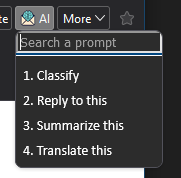
You can open the menu clicking with the mouse on the ThunderAI button or using the CRTL+ALT+A keyboard shortcut.
Then, you can interact with the dynamic menu in many ways.
- Click with the mouse on a prompt name.
- Press a numbered key.
- Start writing one or more letter to filter the prompt name.
By default, after selecting a prompt, you need to press Enter to run it.
You can disable this behavior in the options to run the prompt immediately.